小編用Ubuntu也好久了,今天突然遇到無法線上更新的狀況,查看硬體防火牆規則、DNS設定均沒有問題,到底是怎麼回事呢? 快跟著小編一起來了解吧!
一、情境說明
小編安裝好Ubuntu 24.04後進行線上更新,卻遇到下面的錯誤訊息:
Err:2 http://tw.archive.ubuntu.com/ubuntu noble InRelease
Could not connect to tw.archive.ubuntu.com:80 (103.147.22.36), connection timed out
Err:3 http://tw.archive.ubuntu.com/ubuntu noble-updates InRelease
Unable to connect to tw.archive.ubuntu.com:http:
Err:4 http://tw.archive.ubuntu.com/ubuntu noble-backports InRelease
Unable to connect to tw.archive.ubuntu.com:http:
二、排除方法
(1)、編輯更新的來源
vim /etc/apt/sources.list.d/ubuntu.sources
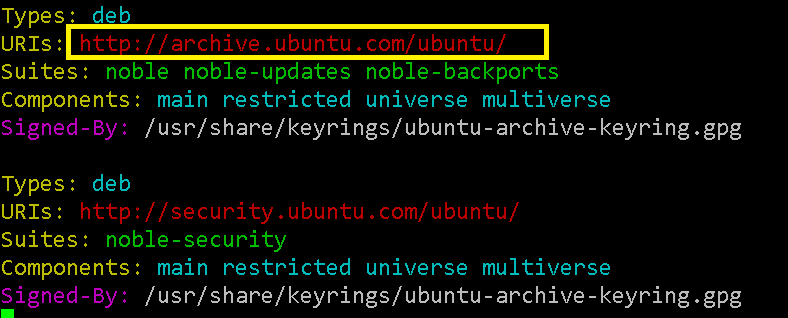
(2)、將來源變更為原廠網址而非各國快取的Mirror站台
Types: deb
URIs: http://archive.ubuntu.com/ubuntu/
Suites: noble noble-updates noble-backports
Components: main restricted universe multiverse
Signed-By: /usr/share/keyrings/ubuntu-archive-keyring.gpg
(3)、再次進行作業系統更新驗證
sudo apt-get update
sudo apt-get upgrade